
Club Membership
Weddings, Baby Showers, Promotions, Birthdays, Retirements
More Than a Meal — A Place to Belong
Air Force Clubs provide more than dining — they’re social anchors on every base. Membership connects you to a supportive community with exclusive benefits, events, and traditions that honor service and strengthen morale.
Club Types:
- Officer Clubs (O-Clubs) – Professional settings for leadership-focused events
- Enlisted Clubs (E-Clubs) – Casual, welcoming spaces for camaraderie and connection
- Combined Clubs – Inclusive environments serving the entire base population
Member Benefits Include:
- Dining and beverage discounts
- Access to exclusive member-only socials
- Priority reservations for base events and holiday functions
- Monthly appreciation nights and special perks
Join the club that supports your lifestyle and your community.
Membership
Looking for special discounts and special treatment at the club? Then now is the time to become an Air Force Club Member! And the value of membership goes with you no matter what club you’re at.

Membership Benefits
- Members-Only Programs
- Dining & Catering Discounts
- Social Hour Specials
- Family Friendly Activities
- Club Connections
- Worldwide Access




How to Become an Air Force Club Member
Signing up to be a club member is easy! Even better, there is no longer credit card requirement to join. So, no credit checks required. Sign up by:
- Clicking the button below to be taken to the onboarding site
- Visiting your club- Additional incentives may be available by joining at your local club

Club Member Portal
Once you become a member, your membership is managed through memberplanet with an online member management system-The Club Member Portal.
- Opt in to receive news about events and member specials
- Choose your dues payment options
- Personalized Club app
- Connect with other members
- Access your digital Club card – show to receive members only discounts and for access to members-only events
Frequently Asked Questions
How I join the Enlisted or Officer Club?
To join the installation club, you will need to visit your base club. You can also visit Memberplanet
How do I access my member card?
1. Go to my user portal
2. Click My Profile
3. Click Member Card in the submenu that appears below My Profile
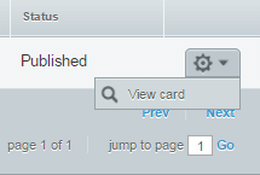
4. Select the gear icon on the right
5. Click View Card in the dropdown menu
How do I update my club membership card?
You can change your club card status by logging into Memberplanet.
How do transfer my membership?
You can transfer your membership by logging into Memberplanet.
How do I access my member card from the mobile app?
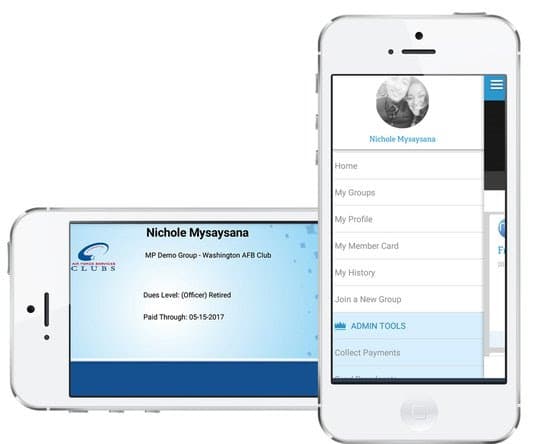
Once membership card has been set up, club members can access and display their digital cards at any time from the mobile app.
1. Log on to the mobile app
2. Tap the main menu icon in the upper left (three horizontal lines)
3. Go to My Member Card
4. Select the group for the card you want to view
How do I cancel my membership?
You can cancel your membership by logging into Memberplanet.
You can email the Air Force Clubs (AFSVC.VMFN.clubs@us.af.